Author: Aaron

Building a no code solution for Class Registration – Part 3

Continuing on from the creation of our initial class form now we will cover the creation of a few basic fields and calculated fields that will support our no code solution.  This time we will edit our list directly in Internet Explorer.

Part 2 of This Series

From the Beginning

  1. Begin by launching Internet Explorer and navigating to your class list.
    1. In my case my address will be: http://localhost/sites/aaronfrench/Lists/Classes/AllItems.aspx
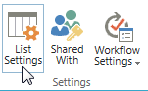
  2. Click on the List tab in the upper left hand of your screen and then click List Settings in the ribbon No Code 3-2
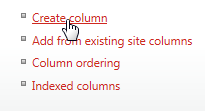
  3. Here we can see all of our setting and fields for our Class list.  Scroll down and click Create Column
    No Code 3-3
  4. In the column name field enter Seats Remaining and choose Calculated for the field type
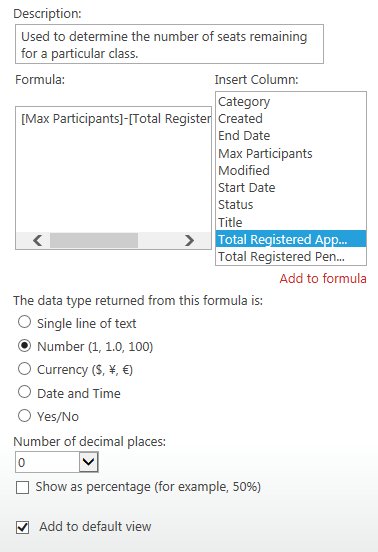
  5. Now enter the Formula text box and enter the following formula determined earlier
    1. [Max Participants]-[Total Registered Approved]
  6. Change the data type returned to Number
  7. Change the number of decimal places to 0
    No Code 3-4
  8. Now click OK
  9. Create another field by clicking on the Create Column link again
  10. Set up the following settings:
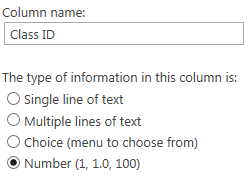
    1. Column Name: Class ID
      1. We will use this column to deal with a limit of SharePoint where we cannot use the ID field in a calculated column
        1. Later we will setup a workflow to assign the list item’s ID to Class ID
    2. Data Type: Number
      No Code 3-5
  11. Click OK
  12. Let’s create another calculated column by clicking Create Column again
  13. Set up the following settings:
    1. Column Name: Registration Link
    2. Data Type: Calculated
    3. Formula:
      1. =IF(Status=”Open”,”<a href=”&”http://
        localhost/sites/aaronfrench/Lists/
        Registration/Item/newifs.aspx?Source=http://localhost/sites/aaronfrench/
        SitePages/Home.aspx&ClassID=”&[Class ID]&”>Register</a>”,””))

        1. Note: You will need to replace localhost/sites/aaronfrench/ with the name of your local SharePoint 2013 site.
    4. Return Date Type: Number
      1. Note: Due to a limitation of SharePoint, you will need to select Number as the return data type to be able to create a viable link.
  14. Click OK
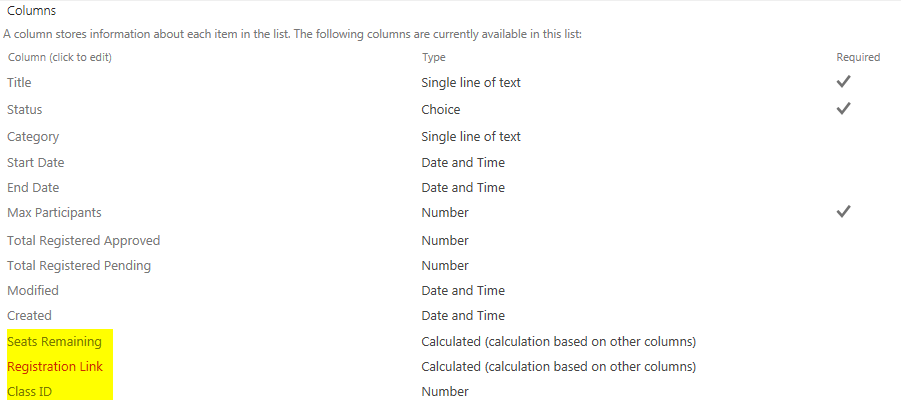
  15. Now we should have three new fields that will support our final solution:
    1. Class ID
    2. Seats Remaining
    3. Registration LinkNo Code 3-6
  16.  To see our handy work let’s view our class list and change our class Status to Open.
    1. Note how the Seats Remaining should equal our Max Participants since we have not yet approved any registrations.   We should see our Registration link, but it should not work quite yet.  If you change the class status to anything other than Open the link will disappear.  That is one handy no code solution tip.  Registration users will not be able to register for a class that is not open for registration…Very Nice!  Finally we will not have anything in our Class ID yet since we need to create a SharePoint workflow in SharePoint Designer 2013

      No Code 3-7
This completes part 3 of our no code solution using SharePoint

Next time, we will setup a SharePoint 2013 workflow to create the Class ID without using any code.  Then create our Registration form.

Part 4 of the Series
Building a no code solution for Class Registration – Part 2

Now it is time to actually get started. Today we will cover the creation of a basic class form using a no code solution tool called InfoPath 2013. Our tool will be hosted on our SharePoint 2013 collaboration site.

Part 1 of This Series


  1. Launch InfoPath Designer 2013No Code 2-1
  2. Select SharePoint List from the New menu
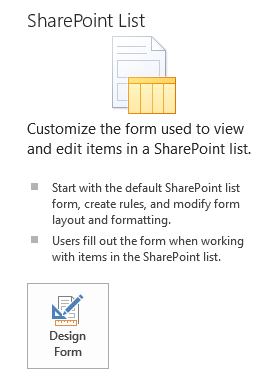
  3. Click Design FormNo Code 2-2
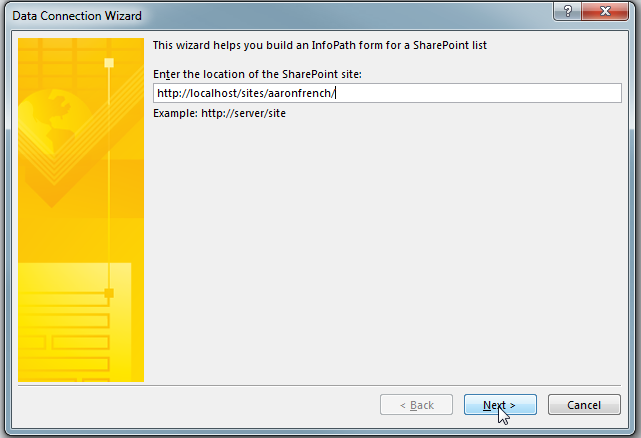
  4. Enter the URL of the SharePoint site you will use to host your siteNo Code 2-3
  5. Click Next
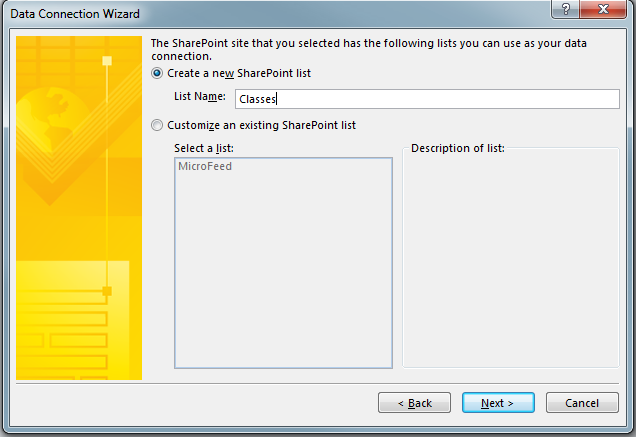
  6. Select Create a new SharePoint list called ClassesNo Code 2-4
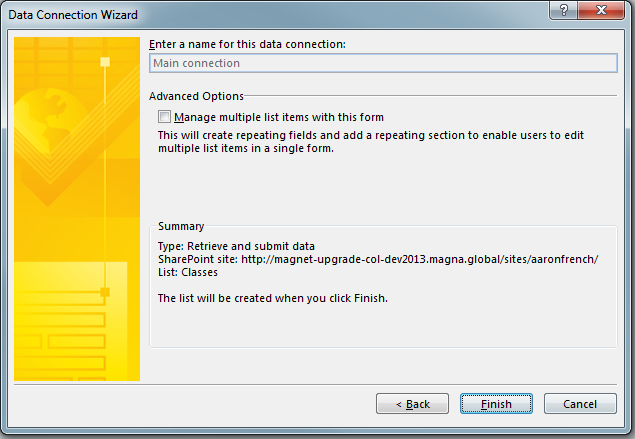
  7. Click Next then FinishNo Code 2-5
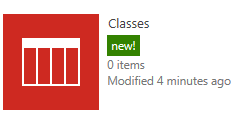
  8. The list will now be created on your SharePoint siteNo Code 2-6
    1. The Default form will show only the Title and AttachmentsNo Code 2-7
  9. Now we need to create the following fields with the following data types by clicking the Add FieldNo Code 2-8
    1. Status (Choice)
      1. Cancelled
      2. Full
      3. Open
      4. Closed
      5. Completed
      6. Unavailable (Default Choice)
    2. Category (Text)
      1. We will later configure this to pull choices from another SharePoint list
    3. Start Date (Date)
    4. End Date (Date)
    5. Max Participants (Number)
      1. Note: this will be a whole number
    6. Registration Link (Calculated Field/Number)
      1. We will adjust this to allow us to give our users a friend link in the list views
    7. Seats Remaining (Calculated Field/Number)
      1. Used to help the workflows determine if a class is full.
      2. Calculation: Max Participants – Total Registered Approved
    8. Total Registered Approved (Number)
    9. Total Registered Pending (Number)
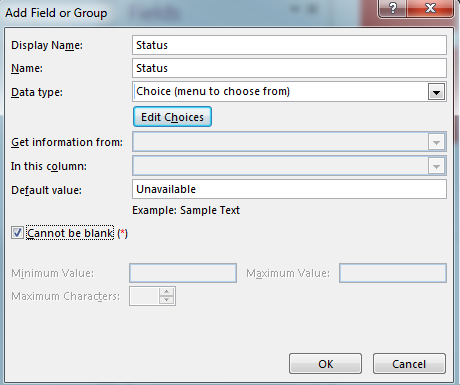
  10. Enter the Display Name Status and select Choice (menu to choose from) for the Data type
  11. Enter a default value of UnavailableNo Code 2-9
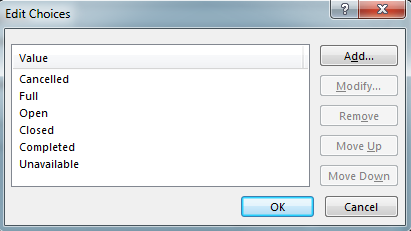
  12. Click the Edit Choices button and click Add/Modify to add the following choices:
    1. Cancelled
    2. Full
    3. Open
    4. Closed
    5. Completed
    6. UnavailableNo Code 2-10
  13. Click OK and OK again to add the Status field
  14. Now repeat adding the following new fields:
    1. Category
      1. Display Name: Category
      2. Data Type: Single line of text
    2. Start Date
      1. Display Name: Start Date
      2. Data Type: Date
    3. End Date
      1. Display Name: End Date
      2. Data Type: Date
    4. Max Participants
      1. Display Name: Max Participants
      2. Data Type: Number
      3. Default Value: 0
      4. Can not be blank checked
      5. Minimum Value: 0
    5. Total Registered Approved
      1. Display Name: Total Registered Approved
      2. Data Type: Number
      3. Total Registered Pending
      4. Display Name: Total Registered Pending
      5. Data Type: Number
  15. Registration Link and Seats Remaining will be added directly to the list later
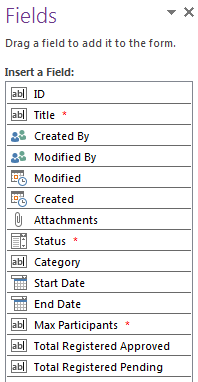
  16. Once you have all of these fields added we can start laying out the formNo Code 2-11
  17. Go ahead and delete the Attachments from the form
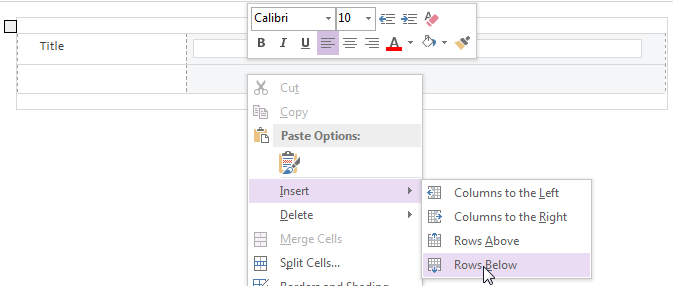
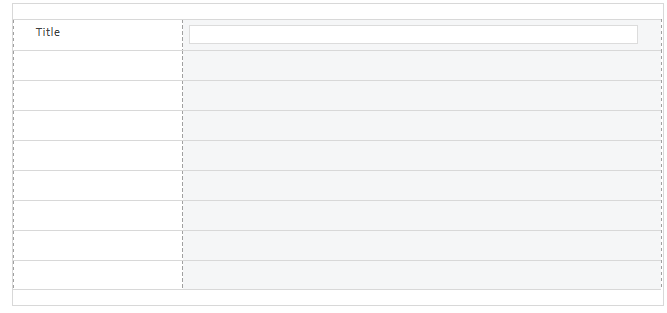
  18. Add a row to the existing table by right-clicking on the blank row that originally had the attachments and clicking on Insert then Rows BelowNo Code 2-12
  19. Continue this process until you have 8 new rows
    1. Tip: You can save time adding rows by selecting multiple rows and then clicking Insert Rows Below. This will add a number of rows relative to the number you have selected already.No Code 2-13
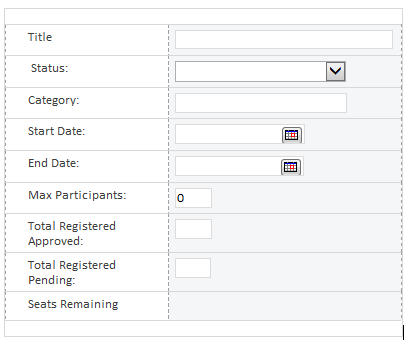
  20. Now click on the fields and drag them to the form. When complete your form should look like this:No Code 2-14
    1. I went ahead and adjusted the field, row and form width till I found a look I liked
    2. Note: I went ahead and typed in Seats Remaining as a placeholder for our future field.
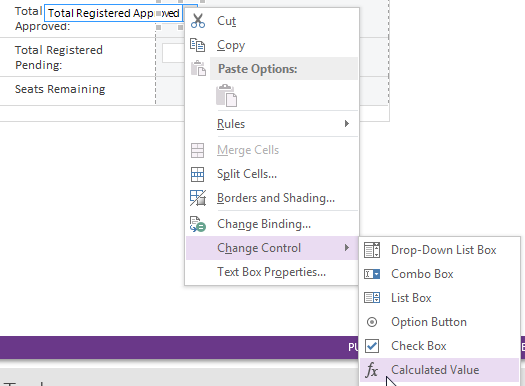
  21. Now right click on the text box for Total Registered Approved and select Change Control and then Calculated ValueNo Code 2-15
    1. This will make the field read-only
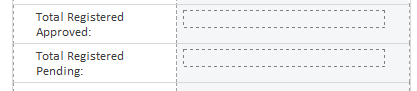
  22. Repeat step 21 for Total Registered PendingNo Code 2-16
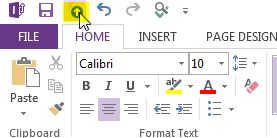
  23. Now let’s publish our form by clicking the Quick Publish link at the top of the InfoPath Designer.No Code 2-17
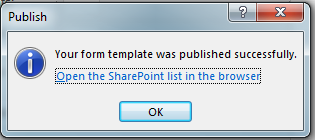
  24. If all goes well you should get this message:No Code 2-18
  25. Click on the “Open the SharePoint list in the browser” to launch our new form.
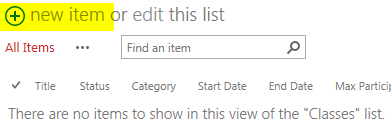
  26. Click New Item to see our form.No Code 2-19
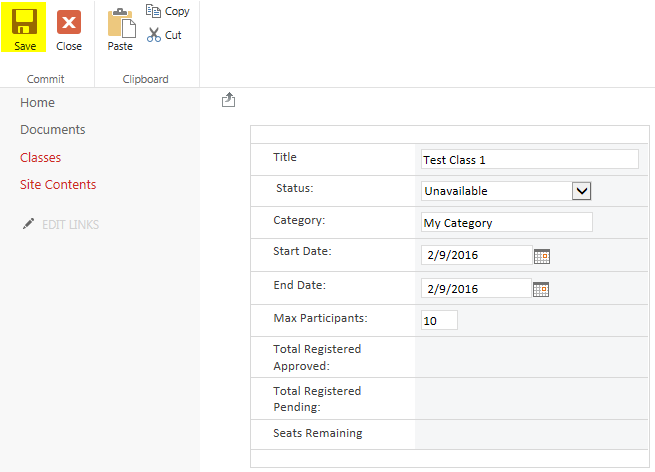
  27. Fill in the form with some test data and click Save.No Code 2-20
  28. Now we have our first class added to the listNo Code 2-21
Congrats Your First InfoPath 2013 no code form is complete

This completes our first walk through on building our basic class registration form in InfoPath using the no code methodology. We have a lot to cover and I don’t want each topic to get too winded. Next time we will add our registration link and set up our calculated fields.

Part 3 of the series

Set your Goal Date Today

Set your goal date today and make a huge leap towards achieving your dreams.

If you are reading this site then you likely share my dream of not being stuck driving into work everyday.  Getting up and getting ready for work; stressing about the pile of work sitting on your desk…

You want to escape and fulfill your dream of becoming a world traveler.  You may even want to seek a job that fulfills a passion.

Honestly, I do not want to be jobless, but I want the option to try any job that peeks my interest without the fear of going hungry and sleeping out in the rain(unless I am in a tent, of course).

A goal is a dream with a deadline.

This quote by Napoleon Hill is a truth worth remembering.  The power of setting a deadline and reminding yourself can have a huge impact on completing your dreams.

My Goal Countdown

Days left to achieve my goal

Until recently I have never actually set a goal date for my dream of finding my escape path.  I finally wrote down a number(5 years  * 365 days = 1825 days till I am done) on a white board to remind myself everyday to get one step closer to my goal.

The impact of doing this has been huge for me.  I walk in every morning into my cubical and wipe off the old number and rewrite the new number.  Even better is the Monday after the weekend.  I get to reduce the number even more.  This acts as a physical and mental reminder to my goal.  Refreshing my interest daily.  Giving my brain a kick in the rear to stay focused and remember why I put it there.

Don’t let your dreams just be dreams.

Set Your Goal Date Today!


What is your goal date and how do you remind yourself daily?

Building a no code solution for Class Registration – Part 1

Getting Started with a No Code Solution

In this multi-part series we will build a no code solution using SharePoint to allow users to create and register for classes.   We will be using SharePoint and InfoPath 2103 to create an out of the box solution.

Each part will aim to focus on adding a single functionality to the final solution.  Some of the main features of this tool will be:

  • Ability to Register for a class
  • Ability to get supervisor approval
  • Support for Multiple Language
  • Ability to close class automatically when full
  • Allow participants to be put into a queue should the class be full before approval
  • Ability for participants to be added on behalf of a requestor
  • Allow classes to have varying class terms and conditions
  • System to automatically display a registration link when a class is available for registration
  • Ability to disable registration when class has reached a registration deadline
  • Allow specific classes to bypass approvals
  • Allow participants the ability to select a specific department/division
  • Allow users to select a supervisor for approval
  • Security to eliminate users for approving themselves
  • Ability to save a registration request without sending out for approval
  • A Registration approval system
  • A cancellation workflow
  • Custom SharePoint user security
  • Configurable and removable sections

First we will begin by drafting up the main class form. Then the individual registration form.  We will then connect the two forms via workflows and then focus on adding some detailed functionality.   Finally we may add some new enhancements; such as reporting, KPIs, web parts to round out the project.

Sit back and enjoy!

Part 2 of the Series

Avoiding Procrastination – Moving Things Forward

Avoiding procrastination has always been a difficult challenge for many people.  I have always had a propensity to procrastinate on some tasks.  Blaming the fact that I just do not have the motivation today to get something started.  Sometimes the overall immensity of the task at hand is so large that my mind becomes overwhelmed and I simply shut down.  This can add even more stress on my mind and body that ultimately other tasks and motivations can become negatively impacted until I freeze in place and nothing gets accomplished.

Today I want to address how I get going on those tougher projects/plans and how I unload my mind from smaller day to day tasks.  The tool I use to really make my life and mind at ease is a little trick from the world of software development.  Commonly known as a SCRUM board.

Generally this tool is used to manage larger software projects.  Enabling software developers to break down larger tasks into more easily manageable tasks that can be completed in a few developing sessions.  I have manipulated this process to accommodate my own day to day tasks.

Everyday all day long if I ever think of a task that I need to accomplish from mowing the lawn or completing an entire restoration of my new sailboat I write it down in a few words on a yellow sticky note.   Generally I write the current date and any relevant information down.  I then place this note on my wall at home.  The notes are broken into three categories:  Backlog, In-Process, Completed.

Backlog

The backlog is where you store anything that has to be done in the future.  Anything that is bothering you and ultimately needs to get accomplished, but not today.

For example: I might need to mow the lawn later this week, but the work is not a pressing subject.

In-Process

Once an item in the backlog needs to be address more critically or I have the time to knock a few items off the list the sticky note gets moved to the In-Process list.  This list should never have more than a few items in it at a time.  It is critical that this list never be overburdened or it will defeat its purpose.

Complete

This is where you can rejoice and reflect on your past accomplishments.  Think of it as a trophy hall of your success.  It can be all too easy to forget what you have accomplished last month let alone yesterday.  What is more motivating than seeing your hard work add up in this pseudo trophy board.

Example Board

Example Board

If you find a task too daunting and you are unable to get motivated to start the task, see if you can break it down further.  * For example, my sailboat that I just purchased last fall needs a lot of cosmetic work.  If I think about everything that has to be done I can easily get overwhelmed.  Instead I pick smaller tasks that need to be accomplished such as removing all the wood trim from the exterior.  This is a task I can get done in an evening after work.  If I still can’t manage to get off my butt, I might break it down even further.  I might simply create a task to load up the car with the required tools.

Generally if I break down a task far enough I will eventually get started and then I often keep going and get a lot more done.  I tend to procrastinate and this helps me get started if I know that the task is small enough.  9 times out of 10 once I get moving I find the motivation to continue.

Once you have completed a task rejoice in your accomplishment and pick another item from you backlog to add to your In-Process board.

Try this process and you will find your mind free to think about other things.  You will get more done, feel less stress and visibly see what you have accomplished.


What tools do you use to avoid procrastination completed in your life?


* Yes, I purchased a small sailboat to start my path to crossing off a bucket list item – Sail to the Bahamas.   I want to start learning about how to sail and see if sailing is truly for me.

Vacation in Nevada

Possibly for the last time I am visiting my best friends in Nevada before the move back to my home state during my holiday vacation.  While I am very excited to have them only a few minutes away by car versus hours by plane it is sad that I may not see the mountains of Lake Tahoe for a long time now.  So there was only one solution to the problem.  I had to spend my holiday break in Nevada.

So I flew out on Christmas evening after the family festivals.  I waved goodbye to everyone and boarded my plane bound for Reno, NV.  I am always amazed by the people you can meet on a plane.   I was chatting to a wonderful lady sitting next to me after helping her with her smartphone.  I was speaking about my long term goals about becoming financially independent one day after hearing about her retirement and that sparked another discussion about sailing and bicycle riding.  Interestingly enough, she personally knew several local people whom live the exact life I envision.  They have sailed and lived aboard a boat for years.  Anyways, I was given some new email contacts to reach out and maybe get some lessons starting next year…  How exciting.

So here I am visiting my friends in Nevada with just a few articles of clothing, books and my laptop.  I am a firm believer in buying experiences instead of material goods.  Some of the things we have planned include:

  • Skiing (Of Course)
  • Bowling
  • Random beer tasting
  • Twister with the kids
  • Fixing vehicles
  • Snowshoeing
  • Hiking
  • Movies (New Laser IMAX in San Francisco)
  • Camping in Death Valley
  • Seeing the great coastal Redwoods
  • Ice skating/Rollerblading
  • Reading
  • Off-roading in the Sierra Nevada Mountains
  • Hanging with friends around the table
One of my best vacations yet!

Christmas Gifts

Christmas was one of the best I can recall, we has some amazing Christmas gifts.  It was fantastic having everyone gathered and even having my girlfriend tag along.  This year my family decided to focus each other’s gifts around items that are either used or handmade.  This proved to be a fantastic idea.  As I am fond of being frugal and minimalist, buying used items or making handmade items helped focused the gifts on being more affordable or practical in nature.  It also helps make the gift giving more personal and creative.

Some of the great ideas that came from my family this year were:

  • Weekend trip to NYC with my father as a thanks for helping me throughout the years and helping so much on the sailboat.
  • Handmade scarves from my sister
  • Handmade lotions and toiletries
  • Handmade colonial flag made out of barn wood from my ever creative father
  • Used VHF handheld radio for my new sailboat
  • Old wooden dolls hidden throughout the living room for the kids to seek and find
  • A first edition book for less than $5 that turns out to be worth many times over
  • Handmade Pottery
  • Individually customized painted dolls

Having everyone together on the holidays are a great time to catch up and share stories

Of course if I am to someday travel on the road or by boat I need to focus on minimizing my possessions and focus more on what’s needed versus desired.  All too often it is easy to get caught up in the Diderot effect when giving and receiving gifts.  I do my best to stay the course and focus on what is it that helps me stay true to my goals and dreams and what does not.

What are your ideas for some amazing Christmas gifts?

Introductions

Sail CruisersHi, I am Aaron.

I live in Michigan, USA and work as a Business Analyst.  For the longest time I have always want to start my own personal blog to challenge myself to become a better writer.  Math and science were always my forte, but writing was another story.  So in an effort to work on my weaknesses and overcome new obstacles I have started my personal blog.

The focus of my blog will be to highlight my past, present and hopefully bright future.  I want to talk about my hobbies, skills, and goals.  I do not want to bore my reader with the same old thing.  So I will focus on unique aspects of my life.